Game Studio Globe
6-month solo gamedev resource project
Published December 2024
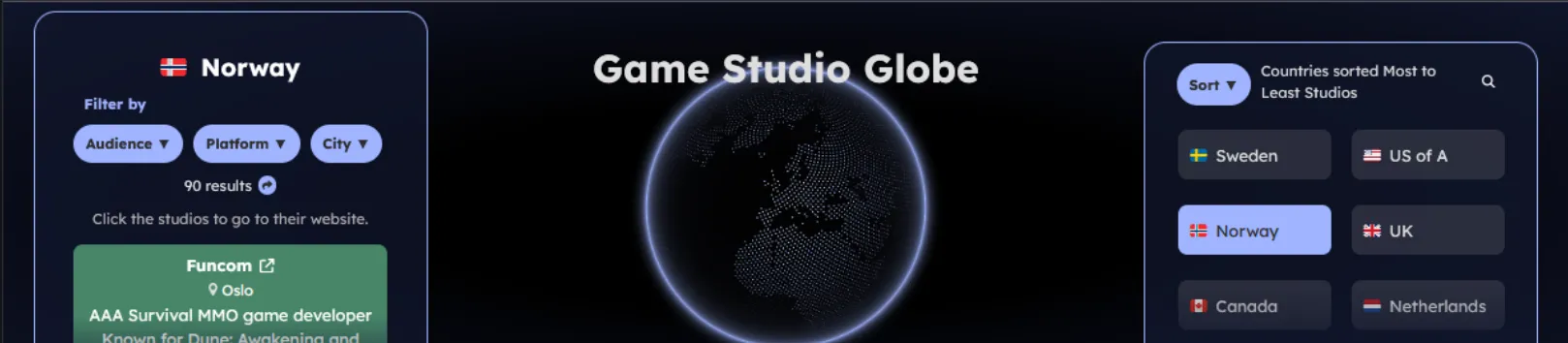
Platform: Web | Link to website
A 6-month solo project focused on one practical goal: make global game studio research faster, clearer, and genuinely useful for graduates and early-career developers searching for work.
I built and maintained a live, searchable database of 750+ game development studios worldwide, then designed a web interface that turns a large dataset into something easy to navigate. Instead of manually collecting links in scattered notes, users can filter studios by country, city, platform, and audience focus, then immediately export and share targeted lists.
The project started as a simple idea after repeatedly seeing graduates spend hours doing repetitive studio research. I moved from rough concept to prototype, tested how people actually search for studios, and then shaped the site around common use cases: quick discovery, shortlist building, and easy sharing of highly specific filtered results.
Development Process
From Idea to Data Workflow
One of the most important design decisions was to keep content management non-technical and fast. Instead of forcing updates through complex admin tooling, I used CSV as the core data source so records could be edited directly in Excel.
This gave the project a lightweight production workflow:
- Research and collect studio records in a structured CSV format.
- Edit and clean rows quickly in Excel (names, links, tags, country/city details).
- Rebuild and publish so updates become searchable on the site.
- Keep the dataset easy to maintain while still scaling to hundreds of entries.
Using CSV made iteration much faster during development and long-term maintenance. It also reduced friction for future updates, because adding or correcting records can be done in familiar spreadsheet tools.
Features
- Comprehensive studio coverage in countries that are often underrepresented in typical job-search resources, including Norway, Iceland, Croatia, and Ireland.
- Advanced filtering by country, city, platform, audience, and tags to surface relevant opportunities quickly.
- Export filtered results to PDF, DOC, or clipboard so users can build personal application checklists.
- Full mobile support with a responsive layout for browsing and shortlisting on any device.
- Dedicated coverage for remote-only and remote-first studios.
- Shareable deep links to specific filtered views, for example: serious XR studios in Hamar, Norway.
Technology Used
Languages
- JavaScript
- TypeScript
- CSS
- HTML
- CSV
- GLSL (shader code)
Frameworks
- React
- Next.js
- Nextra
Libraries / Packages
- cobe
- phenomenon
- react-dom
- react-router-dom
- @jdion/tilt-react
- country-flag-emoji-polyfill
- csv-loader
- date-fns
- file-saver
- jspdf
- helmet
- gh-pages
- esbuild
- glslx
- leva
- react-spring
Companion Electron Data Entry App
To make adding and maintaining studio records even easier, I also built a small desktop data-entry tool with Electron that writes directly into the CSV dataset.
What It Does
- Provides a single-form UI for studio name, homepage, description, tags, and one or more country/city pairs.
- Lets the user choose which CSV file to write to, and remembers that path in local storage.
- Checks whether a studio name already exists in the selected CSV before saving.
- Appends a new row to the CSV when submitted.
How It Is Structured
- Electron app setup and scripts are defined in package.json.
- Main process creates the desktop window and enables Node access in the renderer in main.js.
- UI markup, in-page styles, and country list setup are in index.html.
- Renderer logic handles file picking, duplicate-name checks, dynamic extra country/city rows, and CSV append operations in renderer.js.
- Packaging output settings, including NSIS output config, are in electron-builder.yml.
- Minimal project notes are documented in Readme.txt.
Electron Tool Tech Stack
- Electron runtime and Electron Builder for packaging.
- Node file system APIs from the renderer process.
- PapaParse and Select2 included as dependencies/CDN scripts (while current renderer logic mainly uses manual string construction for CSV rows).
Current Behavior (One Flow)
- Launch app.
- Select a CSV location (or use remembered/default path).
- Fill form fields.
- Optionally add extra country/city entries.
- Check if name exists.
- Submit to append a new CSV line.